
Resolve Claims Tracker
From accident to rental car—streamlining auto claims with embedded, human-centered AI.
Demo
Background
While designing a claims flow for a mid-sized insurance company, I interviewed a business analyst to better understand customer pain points and the internal workflow. One insight stood out: a major bottleneck occurs when assessors are delayed in reviewing vehicle damage, which can stall the entire claim. Customers also frequently expressed the desire have access to rental cars right then and there—to able to book a rental car immediately—something that's long been on their "wish list."
This inspired me to explore how embedded AI might streamline the process, offload time-consuming tasks from support teams, and help customers regain control during a difficult, high-stress event like an auto accident. The Resolve Claims Tracker concept emerged from this curiosity. While not built for a specific client, the design reflects a realistic and scalable approach to a problem faced across the insurance industry.
Project overview
Resolve Claims Tracker is a white-label insurance tool that streamlines the first notice of loss (FNOL) experience using embedded AI.
From accident to rental car, it guides users through policy checks, photo uploads, and eligibility messaging—reducing delays without sacrificing clarity or control. Most follow-up is handled via SMS, keeping the experience lightweight, transparent, and user-friendly.
Impact
The Resolve Claims Tracker shows promise for streamlining complex claim processes and improving user experience.
| Stakeholder | How Resolve Claims Tracker Helps |
|---|---|
| Customer |
|
| Customer Support |
|
| Claims Assessors |
|
| Business |
|

Framework
Define the Jobs to be done
AI capability mapping
Integration strategy with existing UX
Flexibility & personas
Artifacts
Detailed use case
User journey
User flow with AI Integration
Prototype
Starting the journey
The customer journey begins after an accident, when the user logs into the Resolve Claims Tracker to start their claim.
This journey map highlights key pain points and shows where AI can step in to support, guide, and accelerate the experience. See Map
Opportunities for AI
Instant policy-based eligibility checks
Photo damage assessment
Rental car recommendation and booking
Real-time claim tracking and messaging
Contextual help
Decision Flow in Action
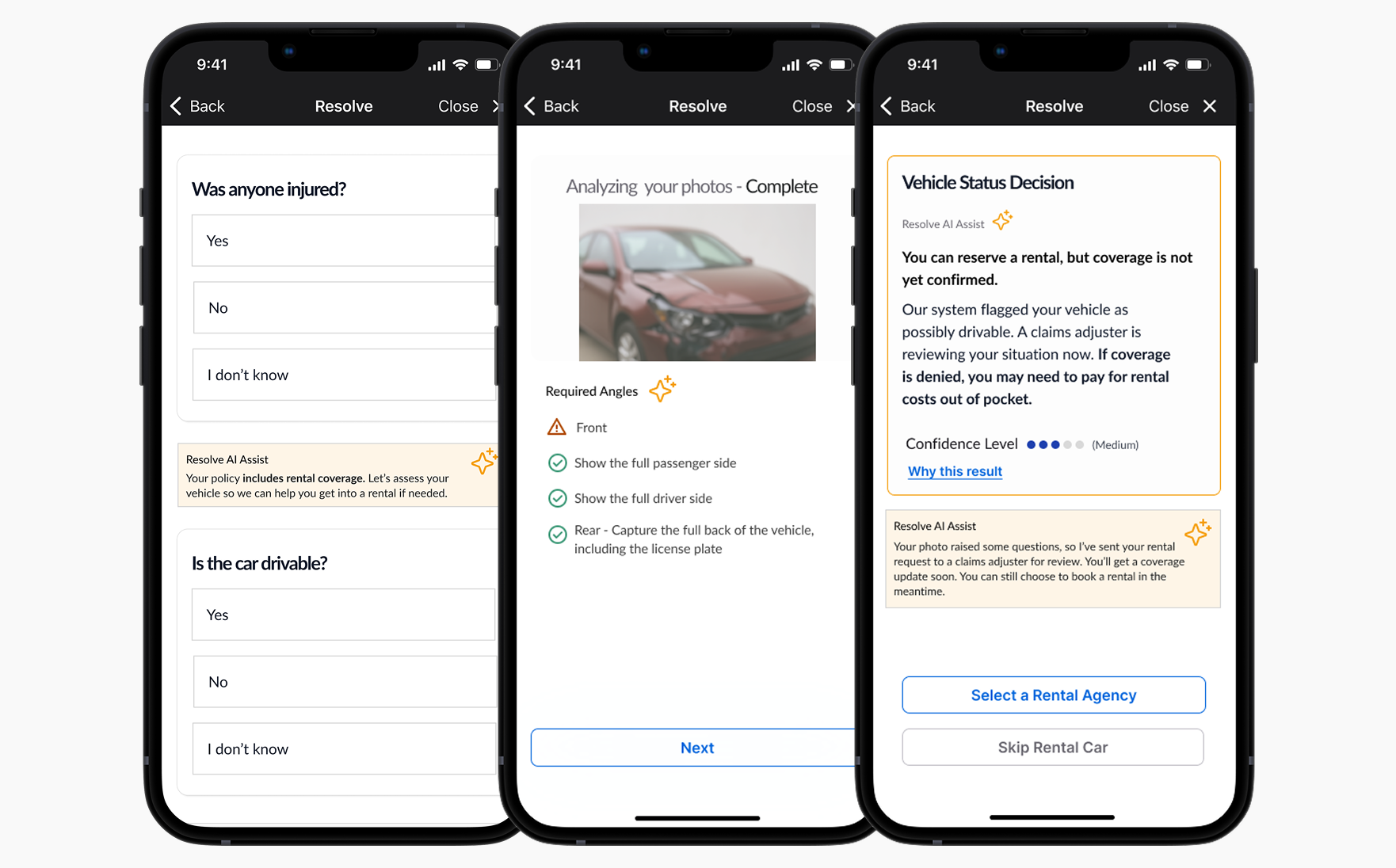
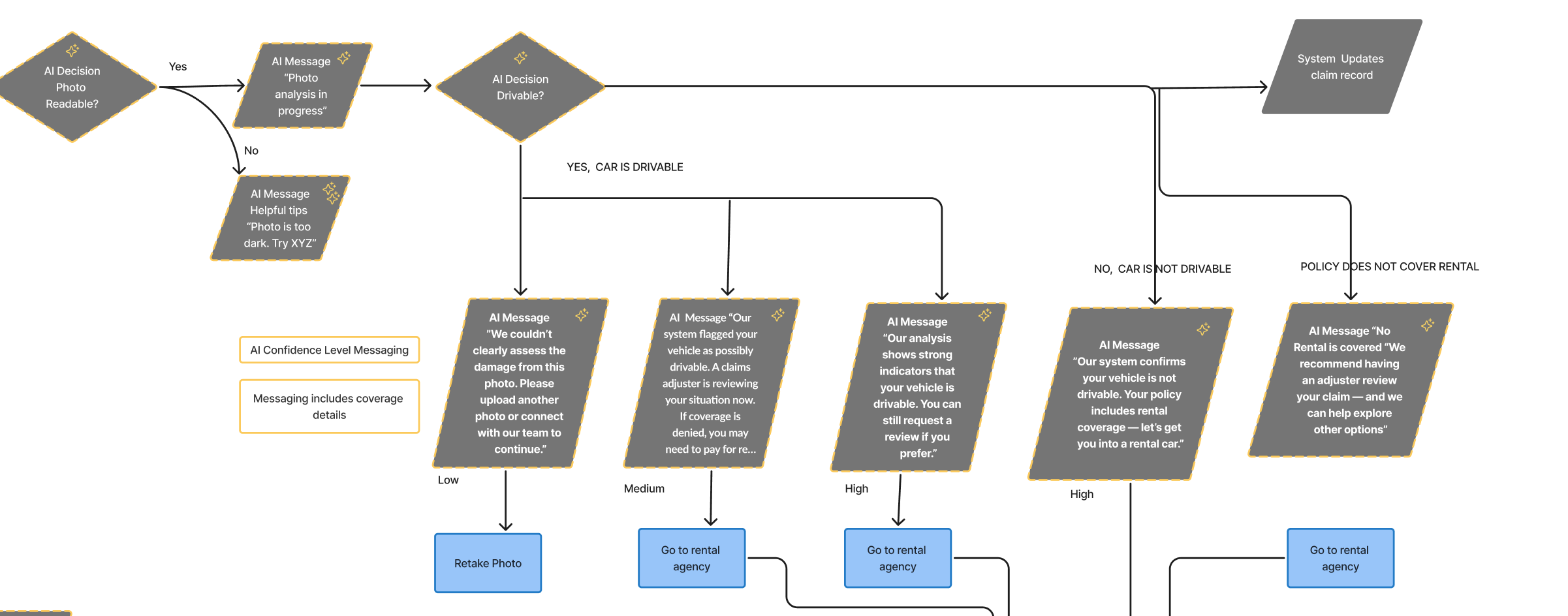
This segment of the Resolve Claims Tracker flow demonstrates how AI is used to evaluate vehicle damage and guide users based on confidence levels. After a user uploads a photo, the system analyzes its visibility and quality.
Depending on the AI's confidence in assessing drivability, tailored messages are delivered—ranging from suggestions to retake the photo, to confidently routing the user toward rental car booking.
The flow also accounts for unclear or low-confidence images, offering alternative actions like submitting more photos, continuing without rental, or contacting support. This logic helps minimize delays while preserving user control and transparency. See Flowchart
Trust
AI decisions must be understandable and traceable, giving users clarity on how vehicle assessments, coverage decisions, and eligibility outcomes are determined.
Design Principles

User Control
Users should have options to override, skip, or ask for help—empowering them to make informed choices that suit their situation.
Usefulness
AI should help users complete key tasks—like uploading photos or booking a rental—by reducing friction and providing clear, efficient guidance.
Human-AI Collaboration
Users should have options to override, skip, or ask for help—empowering them to make informed choices that suit their situation.
Key Screens & UX Patterns
Guided by AI, Grounded in User Needs
Policy Coverage
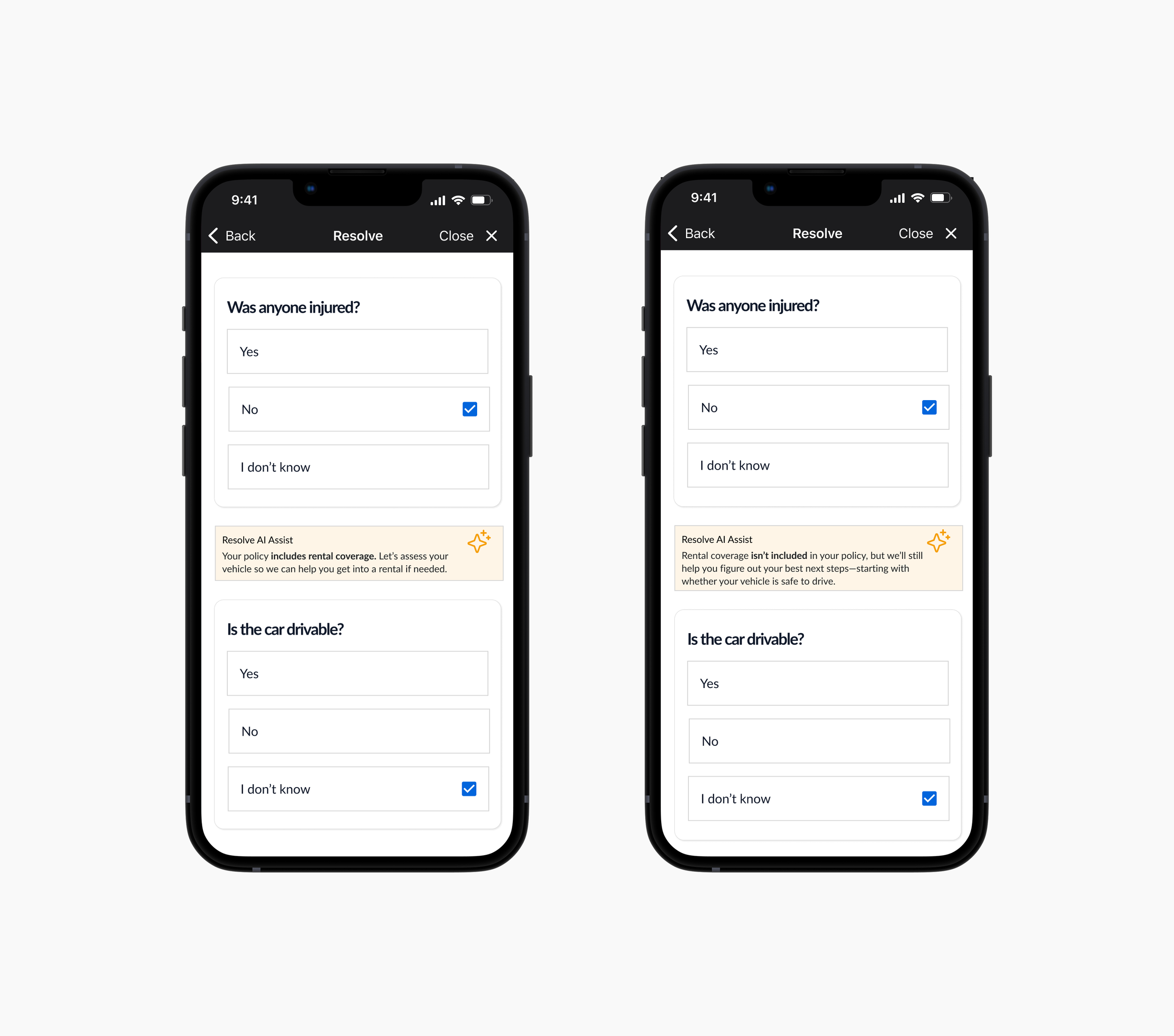
Reviews your policy to determine rental car eligibility
Maintains support and next steps, even without coverage
Helps users feel informed and in control from the start
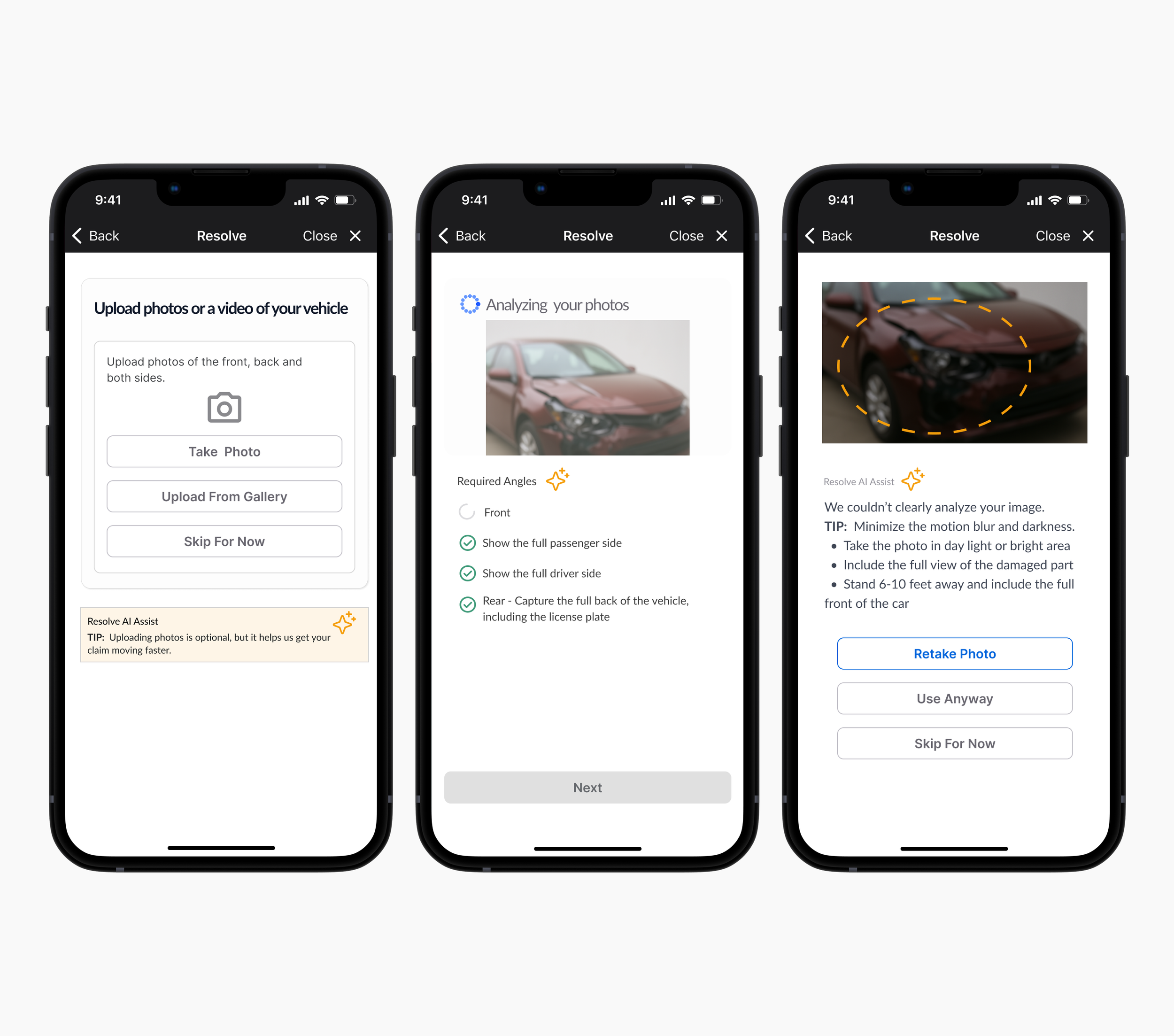
Photo Analysis
Analyzes photos for clarity, angle, and completeness. Speeds up time-sensitive decisions
Speeds up downstream decisions like drivability and rental eligibility
Gives smart, targeted photo-taking tips
Offers user control: retry, override, or skip for manual review
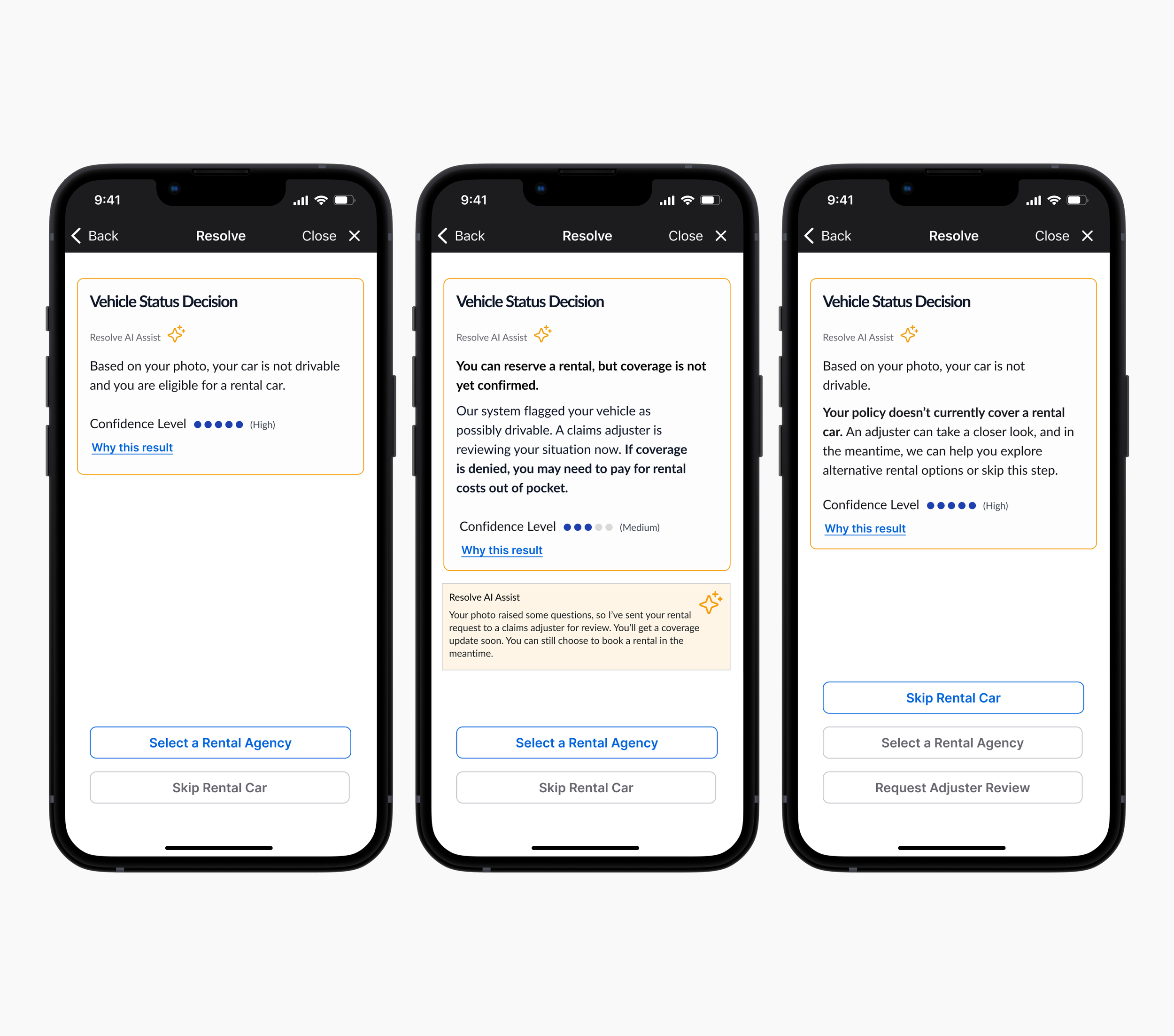
Decision
Interprets image data to assess vehicle drivability
Assigns a confidence level and explains how the result was reached
Adapts messaging based on both policy coverage and damage assessment
Respects user agency with options to skip, self-pay, or request review
Balances automation with human oversight for trust and reassurance
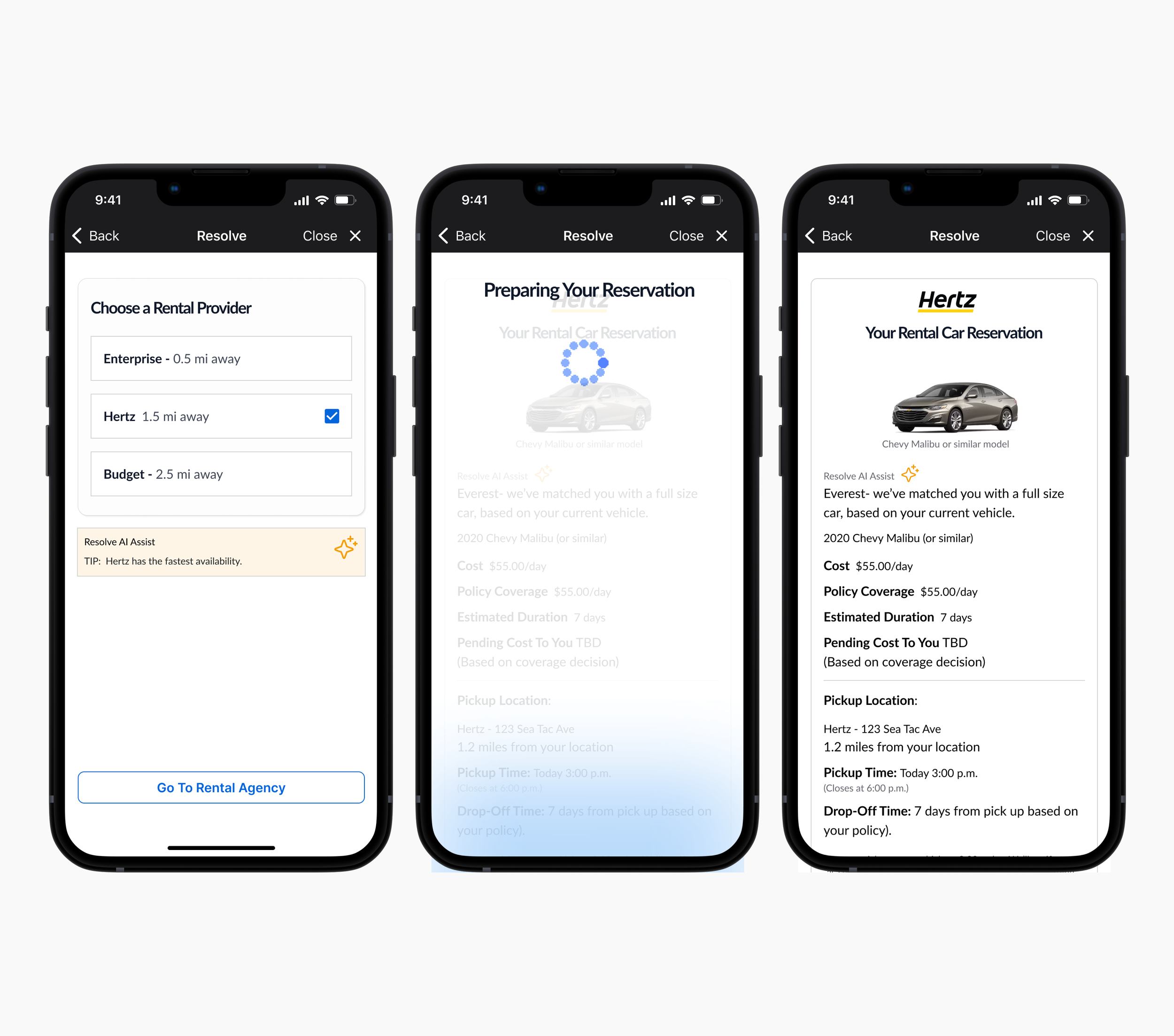
Rental Booking
Recommends rental providers based on real-time availability
Matches user with a vehicle size based on their current car
Builds trust through transparency in cost, location, and next steps
Offers flexible choices
Challenges
Designing with AI required careful attention to trust, control, and clarity. Here are the challenges we faced and how we addressed them through UX.
| Challenge | UX Solution |
|---|---|
| User Distrust in AI Assessments | Displayed confidence levels with rationale and visual cues; users could request adjuster review. |
| Low Confidence in Photo Analysis | Offered photo tips and fallback options; AI explained when it couldn’t assess an image reliably. |
| Uncertainty Around Rental Eligibility | Explained rental eligibility logic clearly; included supportive messaging and help links. |
| Over-Automation Concerns | Let users override, skip, or ask for human support at key points. |
| Transparency in Decision-Making | Included plain-language assistant messages to explain system reasoning. |
| Task Flow Complexity | Used progressive disclosure and guided AI moments to reduce friction and cognitive load. |